
Track trade entries, exits, size, risk, and P/L.
Trade tracker
Last updated July 4, 2026
Trade tracker for tracking trades, stocks, P/L, and reviews
A trade tracker should make every position easier to understand after the fact. Jurnl-It tracks the trade result alongside the setup, risk, screenshots, notes, and process review that explain why the trade happened.
Active traders who want one tracker for trade records, context, screenshots, and review notes.
Keep notes and screenshots attached to each trade.
Review patterns by setup, behavior, and performance.
Real product screenshots
See how the journal looks when review data is connected
These are real Jurnl-It product screens using approved journal data, selected to show the workflow most relevant to this guide. The visible figures illustrate the interface, not typical trading outcomes.
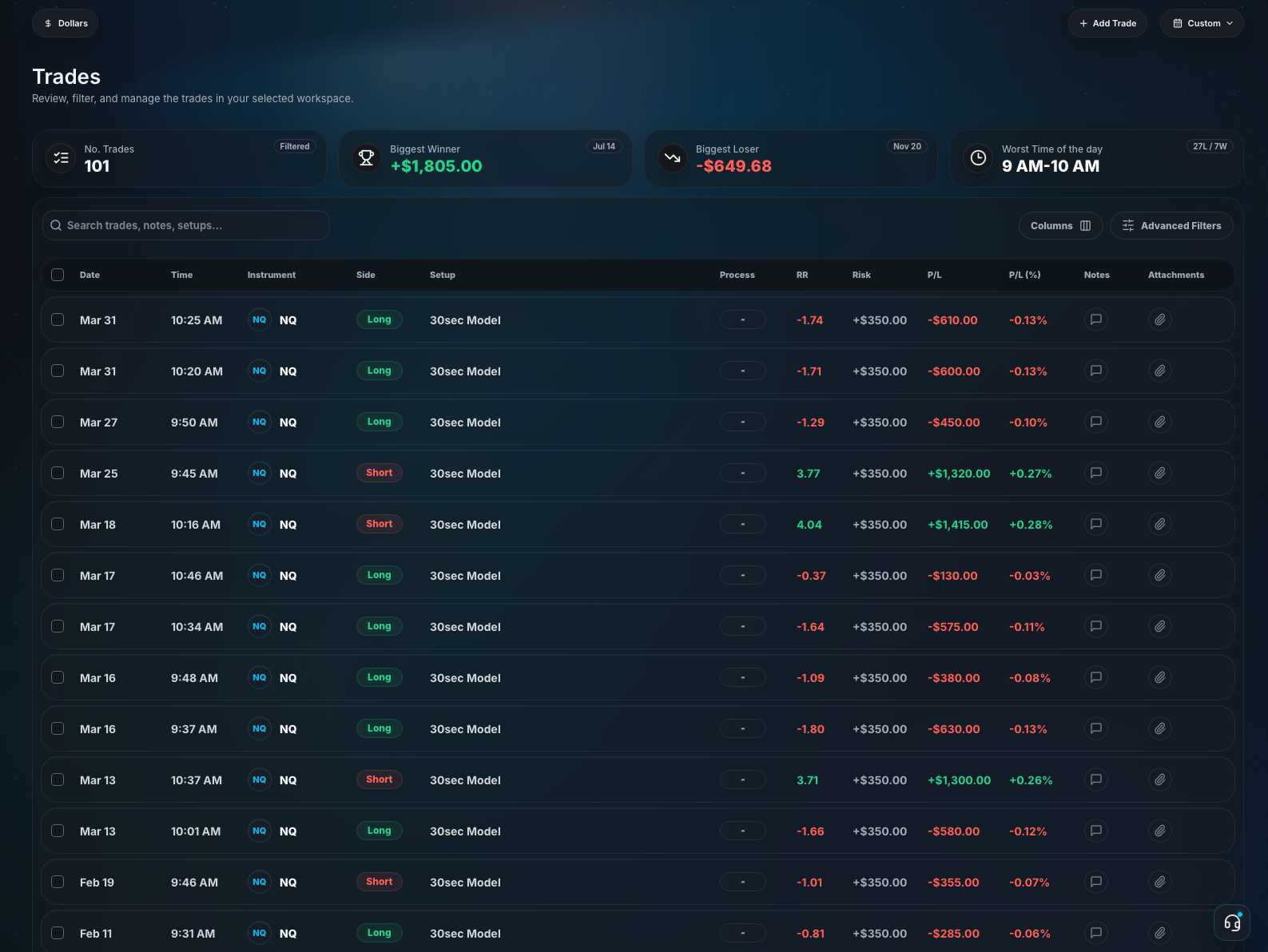
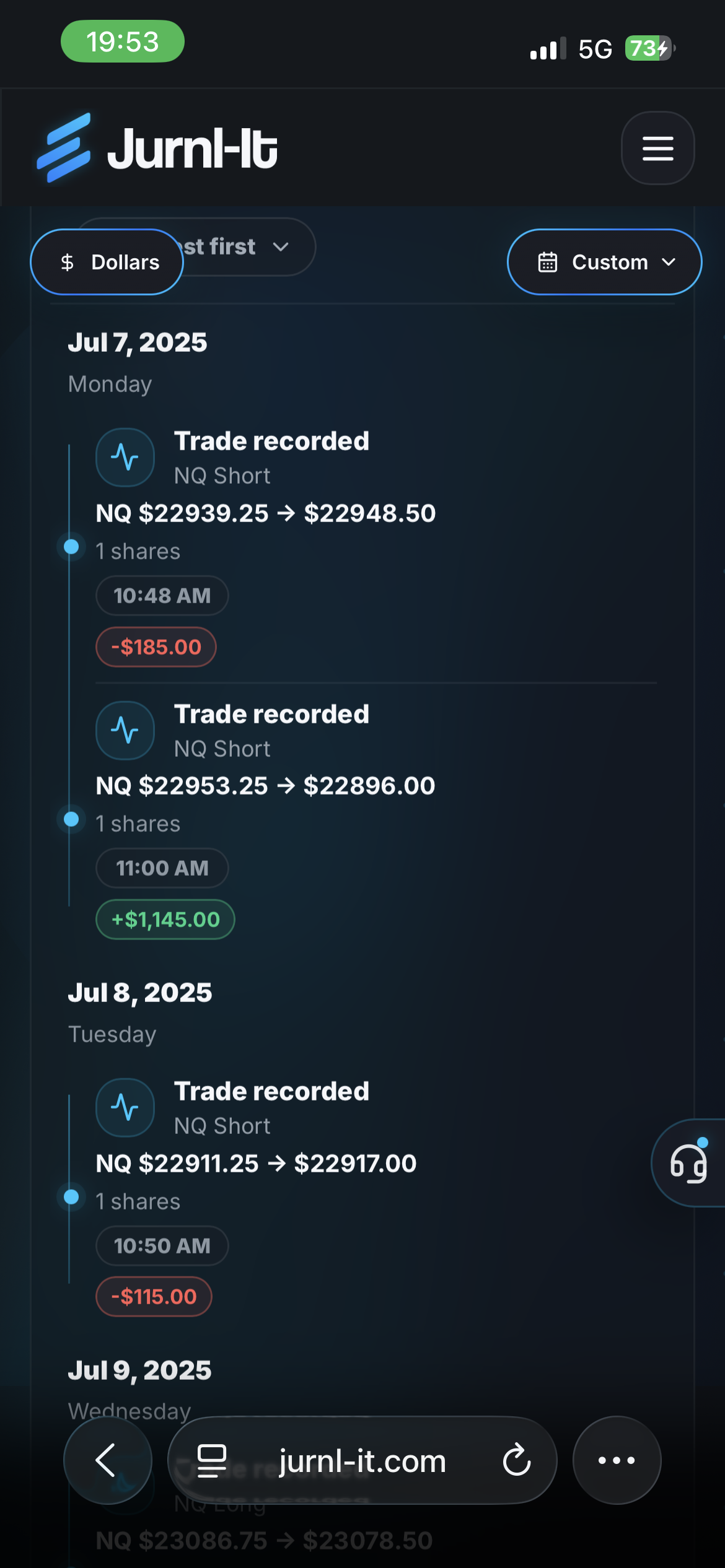
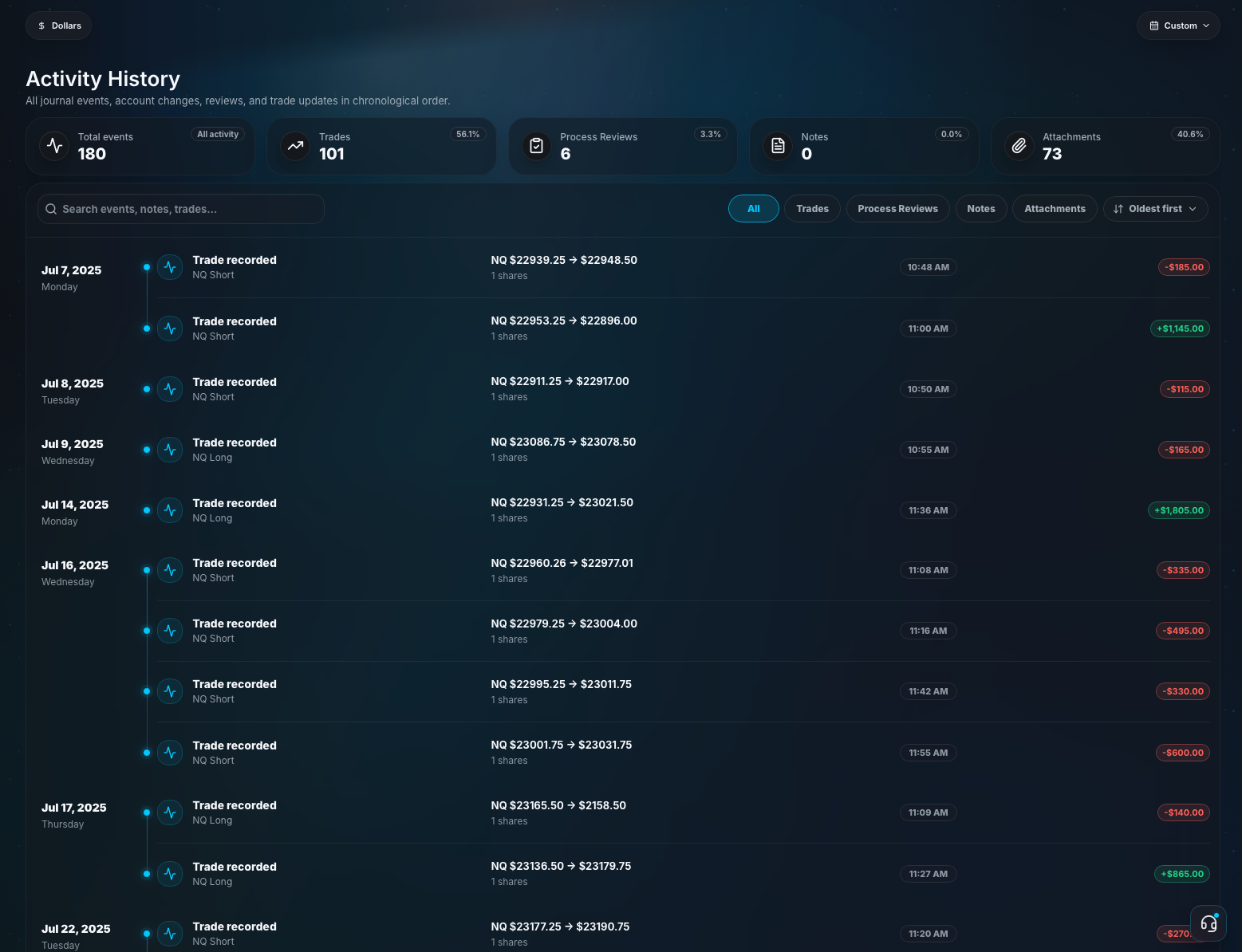
Product proof deep dive
See the review evidence Jurnl-It is built to capture
The pages in this sitemap are not just keyword targets. They are tied to a concrete journal workflow: capture the trade, preserve the context, score the process, and turn the review into a next action.
Demo journal entryStocks / NVDASynthetic example, not financial advice
- Setup
- Breakout retest
- Result
- +1.6R
- Discipline score
- 8/10
Entry followed the setup, risk stayed fixed, screenshot showed the retest, and the exit respected the plan.
Review lesson: Repeat the retest checklist, but avoid taking the same setup when the stop distance is too wide.
Fields that make a trade reviewable
MarketSymbolSidePosition sizeEntryExitPlanned riskP/LSetup tagScreenshotDiscipline scoreReview lesson
Analytics example
Discipline score correlation for this setup
Synthetic sample of 128 trades filtered to Breakout retest on Tuesday, grouped by time of day. The highlighted expectancy column matches the demo entry interval: 10:00-11:30 AM ET.
Discipline score is customizable: you can measure any trading behavior you care about. We recommend starting with setup quality, risk control, entry discipline, exit discipline, and emotional control.
8/10Demo entry discipline scoreMaps to Score 8-10
| Discipline threshold | Trades | Expectancy 9:30-10:00 | Expectancy 10:00-11:30 | Expectancy 11:30-1:00 | Expectancy 2:00-3:30 | Win rate | Review read |
|---|---|---|---|---|---|---|---|
| Score 8-10 | 52 | +0.22R | +2.12R | -0.04R | +0.76R | 58% | Best expectancy; trades followed setup, risk, and exit rules most closely. |
| Score 6-7 | 43 | +0.05R | +0.08R | -0.18R | +0.02R | 49% | Positive but thin; usually one process issue such as late entry or early exit. |
| Score 0-5 | 33 | -0.29R | -0.31R | -0.42R | -0.21R | 22% | Negative expectancy; most trades broke risk, patience, or setup-quality rules. |
Higher discipline scores correlate with better expectancy when the same setup is reviewed by weekday and intraday interval in the demo sample.
Trade data, setup labels, screenshots, notes, planned risk, actual result, and discipline score live in the same review record.
A trade tracker page should prove the journal records the decision context, not only the final P/L.
The workflow separates outcome, execution quality, discipline, risk control, and the lesson for the next session.
This helps traders compare good losses, weak winners, repeated mistakes, and setups that deserve more review.
Insights can connect P/L, win rate, setup performance, risk notes, screenshots, and process patterns.
Searchers looking for tracking, finance, stock market, or investment review tools need evidence that the app turns records into decisions.
Track more than a transaction
A useful trade tracker records the reason for the trade, the plan, the risk, the execution, and the lesson, not only the entry and exit.
Support stock trade tracking without losing context
Stock traders need ticker, catalyst, chart screenshot, risk, position size, and thesis notes in the same record so performance reviews do not rely on memory.
Make P/L easier to explain
P/L matters, but it needs context. Setup labels, screenshots, win rate, risk notes, and process scores help explain why a result happened and whether it was repeatable.
Use tracking to improve reviews
Consistent trade tracking gives weekly reviews better raw material: trades to compare, mistakes to group, and setups to keep or remove.
Review trade tracker with risk context
A useful trade tracker page should connect the visible result to planned risk, position context, rule adherence, and the lesson from the review. Jurnl-It keeps those inputs together so the page supports a real trader workflow instead of a generic definition. The goal is not to predict the next trade; it is to make the previous decision clear enough to learn from.
Connect the page to the wider review system
Use this workflow with trade notes, screenshots, setup tags, discipline scores, and weekly analytics so each page points toward the same habit: capture the decision, review the process, and choose one next action. Internal links between journal, checklist, analytics, and template pages help traders move from reading to reviewing.
Measure expectancy without hiding decision quality
A trade tracker workflow should make expectancy, win rate, P/L, setup quality, and risk decisions easier to compare without turning any one metric into the full story. Jurnl-It separates outcome review from process review so traders can study whether a result came from repeatable execution, oversized risk, emotional trading, or a rule that needs to change.
Turn lessons into one specific rule
The most useful review pages end with a specific behavior change. That could mean reducing size after a rule break, avoiding a weak setup, adding a pre-entry checklist item, saving a chart example, or repeating the condition that produced clean execution. This keeps SEO content tied to the actual product habit.
Include psychology and review cadence
Strong trade tracker content should also name the emotional and timing patterns that affect trading decisions: hesitation, FOMO, revenge trades, overconfidence after wins, and rushed exits after losses. A weekly review cadence gives those patterns a place to surface, so the trader can compare behavior across sessions instead of reacting to one isolated trade.
Compare trade tracking with performance analytics
If you want the tracker view connected to deeper P/L, win rate, and process metrics, see the trading performance tracker and P/L tracker.
Track stock trades with review context
For stock-specific trade tracking and catalyst notes, continue with the stock trading journal and stock market journal.
Product proof
What Jurnl-It gives traders to review better
These are the concrete review inputs that make a journal useful: trade data, context, screenshots, discipline notes, and insights that point back to real decisions.
Every review starts with the reason for the trade
For trade tracker, Jurnl-It keeps the setup, planned risk, notes, and result together so the review can explain why the decision happened.
Process quality stays visible beside P/L
A green day can still contain weak process, and a red day can contain good execution. The journal keeps those signals separate enough to study.
Lessons become the next action
Each page points back to a repeatable loop: capture evidence, score discipline, compare patterns, and choose one rule or setup adjustment.
Built for self-review instead of trade calls
Jurnl-It is designed around private journaling, screenshots, notes, and analytics so traders can review their own decisions without turning the workspace into advice.
Review workflow
A journal should change what happens next
Capture the trade context
Use trade tracker with the market, setup, thesis, planned risk, and notes that explain the decision before hindsight changes the story.
Score the process
Review rule adherence, emotional control, risk management, entry quality, exit quality, and whether the trade followed the plan.
Compare the pattern
Study the page alongside related journal workflows so setup quality, screenshots, P/L, win rate, and review notes point to the same lesson.
Built for review, not trade signals
Jurnl-It focuses on trading review workflows and does not provide trade signals or financial advice.
Risk, discipline, process quality, and review consistency are treated as separate signals from profit and loss.
trade tracker guidance is framed around private self-review, not public trade calls or guaranteed outcomes.
Comparison and alternative pages are written for workflow fit and are not endorsements, guarantees, or affiliation claims.
Questions traders ask
Trade tracker FAQ
What is a trade tracker?
A trade tracker records each trade's market, entry, exit, size, risk, result, notes, screenshots, and review lessons so performance can be studied later.
How is a trade tracker different from a trading journal?
A tracker records trade data. A trading journal adds review context, process scoring, screenshots, emotions, lessons, and a plan for what to change next.
Can I use a trade tracker for stocks?
Yes. Stock traders can track tickers, catalysts, screenshots, entries, exits, position size, P/L, risk, notes, and review lessons in the same workflow.
Topic hub
Build a complete trading journal system
Use these guides together to move from a single trade log into a complete review system for markets, workflows, templates, and alternatives.
Free journal tools
free trading journal appFree trading journal app for disciplined trade reviewtrading journalFree trading journal software for better trade reviewstrading journal appFree trading journal app for trades, notes, and analyticstrading journal templateFree trading journal template for structured trade reviewstrading discipline score templateFree trading discipline score templateTrade tracking
trade notes appTrade notes app for screenshots, setups, and lessonstrade screenshot journalTrade screenshot journal for chart-based reviewbroker import trading journalBroker import trading journal for CSV and MT filesPerformance metrics
trading performance trackerTrading performance tracker for process and resultsP/L trackerP/L tracker for trading performance and reviewwin rate trackerWin rate tracker for trade review and analyticssetup tracking journalSetup tracking journal for repeatable trade reviewsRisk and discipline
trading discipline score templateFree trading discipline score templatetrading discipline checklistTrading discipline checklist for rule adherence reviewstrading rule adherenceTrading rule adherence tracker for process reviewstrading rule-break costTrading rule-break cost worksheet and review methodtrading risk management journalTrading risk management journal for better reviewtrading discipline journalTrading discipline journal for rules and process reviewtrading checklistTrading checklist for rules, risk, and reviewMarkets
day trading journalDay trading journal for fast review cyclesswing trading journalSwing trading journal for multi-day trade reviewsforex trading journalForex trading journal for currency tradersstock trading journalStock trading journal and trade tracker for reviewsStock market and investing
stock market journalStock market journal for active traders and investorsinvestment tracking journalInvestment tracking journal for decisions and reviewportfolio tracker journalPortfolio tracker journal for position decisionsstock portfolio journalStock portfolio journal for trades and position notesComparisons
trading journal spreadsheetTrading journal spreadsheet vs trading journal appTradeZella alternativeTradeZella alternative for process-first trade reviewsTraderSync alternativeTraderSync alternative for structured trading reviewsTradervue alternativeTradervue alternative for trade reviews and analyticsRelated trading journal guides
Trading performance trackerTrading performance tracker for process and resultsP/L trackerP/L tracker for trading performance and reviewStock trading journalStock trading journal and trade tracker for reviewsTrade screenshot journalTrade screenshot journal for chart-based reviewTrade notes appTrade notes app for screenshots, setups, and lessonsTrading journal softwareFree trading journal software for better trade reviewsTrading discipline checklistTrading discipline checklist for rule adherence reviewsTrading rule adherenceTrading rule adherence tracker for process reviews